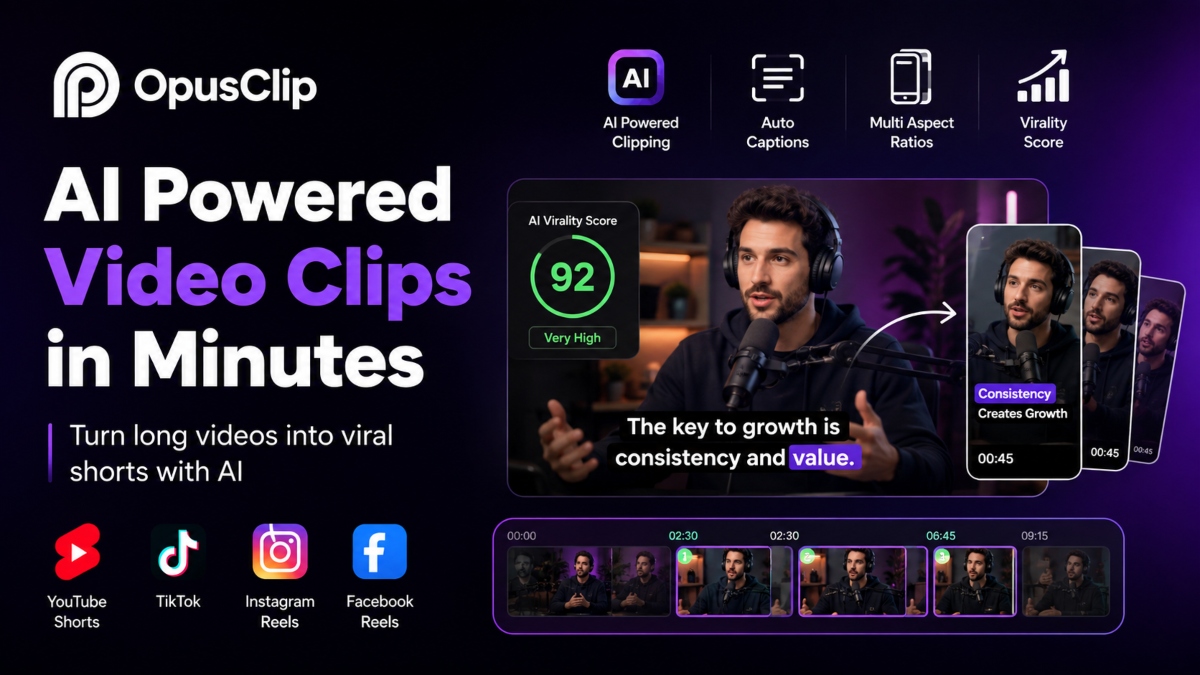
Opus Clip is an AI powered video editing platform that turns long videos into short clips ready for social media. It helps transform podcasts, webinars, interviews, tutorials, livestreams, and YouTube videos into engaging content for platforms such as TikTok, Instagram Reels, and YouTube Shorts. Instead of spending hours searching through footage, users can upload a video and let the platform identify moments that are more likely to keep viewers watching.
Content creators, marketers, agencies, educators, and businesses choose Opus Clip because it saves time while producing clips that need only minor edits before publishing. Features such as automatic captions, smart video resizing, speaker tracking, brand templates, and simple editing tools help maintain a consistent look across every clip.
This review explains how Opus Clip works, its most useful features, pricing structure, strengths, limitations, and the types of users who benefit from it. You will also learn how it compares with other AI video editing tools so you can decide whether it fits your content creation workflow.
What Is Opus Clip?
Opus Clip is an AI powered video repurposing platform that helps creators convert long videos into short clips suitable for popular social media platforms. Instead of manually searching through hours of footage, the platform analyzes video content and identifies moments that are more likely to attract viewers. This allows users to create ready to publish videos in much less time while keeping the editing process simple.
Whether the original content is a podcast, webinar, interview, livestream, tutorial, or YouTube video, Opus Clip transforms it into vertical videos that fit platforms such as TikTok, Instagram Reels, Facebook Reels, and YouTube Shorts. It also generates captions, resizes videos for different formats, and keeps the main speaker or subject in focus throughout each clip.
A Quick Overview of Opus Clip
Opus Clip is designed for creators and businesses that publish video content regularly. The platform uses artificial intelligence to understand spoken words, visual scenes, and audience engagement signals before creating multiple short clips from a single source video. This process helps maximize the value of existing content without requiring hours of manual editing.
Its automatic captions, smart reframing, and simple editing tools make it easier to prepare videos for different social platforms while maintaining a consistent appearance. The result is a faster workflow that supports regular content publishing.
What Makes Opus Clip Different?
Unlike traditional video editors that require users to review every minute of footage, Opus Clip places artificial intelligence at the center of the editing process. The platform automatically selects strong moments, creates complete clips, and prepares them for publishing with very little effort from the user.
Creators can still review and adjust captions, trim clips, or customize branding before exporting. This combination of automation and editing flexibility makes Opus Clip a practical choice for anyone looking to produce more short videos from long form content while reducing editing time.
How Opus Clip Works
Opus Clip follows a simple workflow that turns long videos into short clips suitable for social media. Most of the heavy work happens automatically, allowing creators to spend less time editing and more time publishing content. From importing a video to exporting ready to share clips, each step is designed to speed up content production while keeping quality high.
Upload Your Source Video
The process begins by importing a long form video into Opus Clip. Users can choose from several popular sources, making it easy to work with content that has already been recorded. Supported import options include YouTube, Zoom, Loom, Twitch, Google Drive, Dropbox, and direct uploads from a local computer.
Once the video is uploaded, the platform prepares it for processing. Credits are usually based on the total length of the source video instead of the number of clips created. This means one long recording can produce several short videos without additional processing for every individual clip.
This flexible upload system works well for podcasters, educators, marketers, businesses, and creators who regularly produce interviews, webinars, livestreams, tutorials, or presentations.
AI Analyzes Your Content
After the upload is complete, Opus Clip begins examining the entire video through several AI technologies working together.
Natural Language Processing helps the platform understand spoken words, conversation topics, and sentence structure. Rather than treating the transcript as plain text, it recognizes meaningful sections that are suitable for short videos.
Audio analysis examines voice patterns, pauses, emphasis, laughter, and changes in speaking energy. These signals help identify moments that sound more engaging and natural for viewers.
Computer vision studies the visual side of the video. It detects people, objects, camera movement, facial positioning, and scene changes so the final clip keeps the main subject in focus.
These technologies work together through multimodal processing. Instead of relying on only audio or only visuals, the platform combines speech, sound, and video information to understand the complete context before creating clips.
AI Finds the Best Moments
Once the video has been analyzed, Opus Clip searches for sections that are more likely to capture viewer attention.
The platform identifies strong opening hooks that can encourage people to continue watching. It also looks for emotional moments, interesting discussions, surprising facts, and memorable statements that naturally fit short form video.
Audience retention patterns also play a part in clip selection. The AI uses data learned from large collections of successful short videos to estimate which moments may keep viewers watching longer.
After selecting suitable sections, Opus Clip automatically creates complete clips with logical starting and ending points. Each clip receives a Virality Score that estimates its potential performance based on various engagement signals. While this score is only a prediction, it gives creators another reference when deciding which clips to publish first.
Automatic Captions and Reframing
One of the strongest features of Opus Clip is its ability to prepare videos for different social platforms without requiring separate editing.
The platform automatically creates captions with good accuracy and allows users to customize fonts, colors, styles, and placement before exporting. Captions improve accessibility and help viewers follow the content even when videos play without sound.
Subject tracking keeps the main speaker or important object centered throughout the clip. As people move around the frame, the platform adjusts the crop automatically to maintain focus.
Opus Clip also converts landscape videos into formats suitable for mobile viewing. Videos can be optimized for several aspect ratios, including vertical, square, and other popular social media formats. This removes much of the manual work normally required when publishing the same content across different platforms.
Edit and Export Your Clips
Although most editing is completed automatically, creators still have control over the final result.
Users can edit captions, trim the beginning or ending of clips, rearrange sections, and make small adjustments before publishing. The editor also supports adding B roll, overlays, simple visual effects, and smooth transitions to improve presentation.
Once editing is complete, clips can be exported in high quality for sharing on multiple social platforms. Many users publish directly to destinations such as YouTube Shorts, TikTok, and Instagram Reels, helping speed up the publishing process.
For businesses and larger teams, Opus Clip also supports API integration. This allows developers and companies to connect the platform with existing content workflows, making it easier to automate video processing from upload through final publishing.
Opus Clip Features
Opus Clip includes a wide range of AI powered tools that help creators produce short videos with less manual work. From identifying engaging moments to preparing clips for different social platforms, the platform combines automation with editing controls that suit beginners, professionals, and marketing teams. Its features are designed to reduce repetitive tasks while giving users enough flexibility to customize the final result.
AI Clipping Engine
The core of Opus Clip is its AI clipping engine, which analyzes long videos and turns them into multiple short clips. Instead of splitting footage into random sections, the platform understands conversations, visuals, and speaking patterns before deciding which moments deserve attention.
One of its most notable technologies is ClipAnything. This AI model works with many types of video content, including podcasts, interviews, webinars, educational lessons, gaming videos, product demonstrations, and vlogs. Because it studies both spoken content and visual elements, it can process videos that contain very little dialogue as well as recordings with continuous conversations.
Highlight detection is another important feature. The platform searches for moments with interesting discussions, memorable statements, changes in tone, audience engagement signals, and strong introductions. These selected sections are then organized into clips that feel complete instead of appearing randomly cut.
Smart clip generation reduces the amount of editing required after processing. The generated clips usually include suitable starting points, natural endings, captions, and formatting that only require small adjustments before publishing.
Automatic Video Optimization
Creating videos for several social platforms often requires different dimensions and formatting. Opus Clip simplifies this process by preparing content for multiple destinations automatically.
The platform converts landscape videos into vertical formats suitable for mobile viewing. It also supports square layouts and other popular aspect ratios used across social media. This allows creators to use the same source video for different platforms without repeating the editing process.
Dynamic captions improve both accessibility and viewer engagement. Captions are generated automatically and can be customized with different fonts, colors, sizes, animations, and text styles. Users can adjust their appearance to match personal preferences or business branding before exporting.
Each generated clip also receives a Virality Score. This score estimates how well the clip may perform based on AI analysis of engagement patterns. Although it cannot guarantee future results, it provides another reference when choosing which clips deserve priority during publishing.
Branding Tools
Maintaining a consistent visual identity becomes much easier with the branding features available in Opus Clip.
Brand templates allow users to save colors, layouts, fonts, and design preferences for repeated use. Instead of applying the same settings to every new project, creators can select a template and maintain a consistent appearance across all published videos.
Custom fonts provide additional flexibility for businesses and creators that already follow brand guidelines. Logos can also be added directly to videos, helping improve recognition across different social platforms.
The platform supports custom intro and outro sections that can be reused across multiple projects. This saves editing time while giving videos a professional appearance from beginning to end.
Brand vocabulary is another useful feature. Users can define preferred spellings, product names, company terminology, and other custom words so captions remain accurate throughout different projects.
Video Editing Tools
Although Opus Clip focuses on automation, it also includes editing features that allow users to refine every generated clip before publishing.
Users can remove filler words and unnecessary pauses to create smoother conversations without manually editing every section. This is particularly useful for podcasts, webinars, interviews, and educational recordings where natural speech often contains repeated words or long pauses.
Audio cleanup improves voice clarity by reducing unwanted background sounds and making spoken content easier to understand. Better audio quality creates a more enjoyable viewing experience across different devices.
The platform also supports editing full length videos instead of limiting users to short clips. This gives creators additional flexibility when preparing content for YouTube or other platforms that support longer videos.
Automatic B roll generation can insert supporting visuals into suitable sections of a video. This creates more engaging presentations while reducing the amount of manual editing required.
Collaboration and Workflow
Opus Clip includes collaboration features that help teams manage larger content production projects.
The team workspace allows multiple users to access shared projects, review edits, and maintain consistent branding across different campaigns. This makes the platform useful for agencies, businesses, and marketing teams that manage content for several clients or departments.
A built in scheduler helps organize publishing without switching between several applications. Users can prepare clips in advance and manage publishing plans more efficiently.
The content calendar provides a central location for organizing upcoming videos and maintaining a regular posting schedule. This helps creators keep track of published content and future projects.
For businesses that require automation, API integrations make it possible to connect Opus Clip with existing software and production workflows. Companies can automate video processing, publishing, and content management while reducing repetitive manual work. These workflow features make the platform suitable for both individual creators and organizations producing large volumes of video content.
Who Should Use Opus Clip?
Opus Clip is designed for people and organizations that regularly create long form video content and want to publish more short videos without spending hours editing. Its AI powered workflow reduces manual work while helping users produce content for several social media platforms from a single recording. Whether you create videos for personal branding, education, or business marketing, the platform can simplify content production and support a more consistent publishing schedule.
Best Users
Podcasters
Podcasters often record episodes that last from thirty minutes to several hours. Opus Clip can turn one episode into multiple short clips that highlight interesting conversations, memorable quotes, or useful tips. These clips are ideal for promoting full episodes across social media.
YouTubers
Creators who publish long YouTube videos can use Opus Clip to produce YouTube Shorts and content for other platforms from existing recordings. This helps extend the reach of every video while reducing editing time.
Marketing Agencies
Agencies managing several clients can process large amounts of video content more efficiently. Brand templates, shared workspaces, and editing tools help maintain a consistent appearance across different campaigns while allowing teams to deliver content faster.
Social Media Managers
Managing daily content for multiple platforms often requires a steady supply of videos. Opus Clip helps social media managers convert webinars, interviews, product demonstrations, and live events into short clips that are ready for publishing throughout the week.
Coaches and Consultants
Business coaches, fitness trainers, and consultants can transform workshops, live sessions, and question and answer recordings into educational clips that help attract new audiences and keep existing followers engaged.
Course Creators
Online educators can create shorter lessons, learning highlights, and promotional videos from full training sessions. This allows them to promote courses while making educational content easier to consume.
Businesses
Companies can reuse product demonstrations, customer presentations, webinars, company announcements, and event recordings for social media marketing. This increases the value of every recorded video without creating new content from the beginning.
Who May Not Need It
Although Opus Clip is a capable AI video editing platform, it is not intended for every stage of video production.
It is not designed for recording videos directly. Users will need another application or camera to capture footage before importing it into the platform.
It also does not replace teleprompter software. Creators who depend on scripted presentations while recording will need a separate teleprompter solution.
Opus Clip is not a script writing tool. It focuses on editing and repurposing completed videos rather than generating video scripts or planning content.
People looking for a mobile application to record and edit videos from start to finish may also prefer another solution. Opus Clip performs best after a video has already been created and is ready to be converted into short, shareable content.
Pros and Cons of Opus Clip
Opus Clip offers a strong balance between automation and editing control, making it a popular choice for creators and businesses that publish video content regularly. Like any AI powered platform, it has clear strengths along with a few limitations that users should consider before choosing it for their workflow.
Advantages
One of the biggest benefits of Opus Clip is the amount of time it can save during video editing. Instead of reviewing an entire recording manually, users can upload a long video and receive several short clips within minutes. This allows creators to publish more content without spending hours editing each project.
The platform also produces captions with a high level of accuracy. Since many people watch videos without sound, captions help improve accessibility while making content easier to follow across social media platforms. Users can edit the text and customize its appearance to match their preferred style.
Another strength is its smart AI clipping technology. Rather than selecting random sections, Opus Clip analyzes conversations, visuals, and engagement signals to identify moments that are more suitable for short videos. This creates clips that usually require only minor adjustments before publishing.
The workflow also scales well for creators, agencies, and businesses that manage large amounts of video content. A single webinar, podcast, or interview can produce several clips, making it easier to maintain a consistent publishing schedule across different platforms.
Brand consistency is another valuable advantage. Features such as brand templates, custom fonts, logos, and reusable visual settings help every published clip maintain the same professional appearance.
Limitations
Although Opus Clip offers many useful features, there are a few limitations to keep in mind.
The platform uses a credit based pricing model that charges according to the length of the source video. Users who process long recordings on a regular basis may need additional credits, which can increase overall costs over time.
While the AI performs well in many situations, manual review is still recommended before publishing. Some clips may need small adjustments to improve timing, remove unnecessary sections, or better match a specific brand voice.
New users may also experience a short learning period while becoming familiar with the editor, customization options, and project settings. Most tools are easy to understand, but using every feature efficiently takes some practice.
Finally, the editing tools are intended for quick content production rather than advanced video editing. Creators who require detailed visual effects, motion graphics, or complex timeline editing may still need dedicated professional editing software for those tasks.
Opus Clip Pricing Overview
Opus Clip uses a credit based pricing system instead of charging only by the number of exported clips. This approach allows users to create multiple short videos from a single source recording while paying according to the amount of video processed. Before choosing a plan, it is helpful to understand how credits work and whether the pricing matches your content production needs.
Credit Based Pricing Model
Credits are used whenever a video is processed through the platform. In general, the number of credits required depends on the length of the original video rather than the number of clips generated from it. For example, processing a longer webinar or podcast will consume more credits than uploading a short tutorial.
One advantage of this system is that a single processed video can produce several clips without requiring additional processing for every individual export. This makes it easier to create enough content for multiple social media platforms from one recording.
When selecting a subscription, users should estimate how much video they plan to process each month. Someone uploading a few short videos occasionally will use fewer credits than a business that processes hours of content every week. Reviewing monthly usage can help avoid running out of credits or paying for more processing capacity than necessary.
Is It Worth the Cost?
The value of Opus Clip depends largely on how often you create video content.
For individual creators who publish YouTube videos, podcasts, or educational content on a regular basis, the platform can save many hours of editing time each month. The time saved may easily justify the subscription cost.
Teams that manage content together can benefit from shared workspaces, consistent branding, and faster production. These features help improve collaboration while reducing repetitive editing tasks.
Marketing agencies often receive even greater value because they handle content for multiple clients. Producing several clips from each recording allows agencies to deliver more social media content without significantly increasing editing time.
Businesses that create large volumes of webinars, product demonstrations, training videos, and promotional content can also benefit from the platform. The combination of automation, workflow tools, and content repurposing helps maximize the value of every recorded video while supporting a consistent publishing schedule.
Best Use Cases for Opus Clip
Opus Clip is flexible enough to support many types of video content. Whether you create videos for marketing, education, or business communication, the platform helps transform long recordings into short clips that are easier to share across social media. By reusing existing content, creators can reach more viewers while reducing the time spent on manual editing.
Content Marketing
Content marketers often produce videos for blogs, social media, product launches, and brand awareness campaigns. Opus Clip makes it easy to turn a single recording into multiple short videos that can be shared throughout the month. This helps maintain a regular posting schedule while increasing the value of every piece of content.
Podcast Repurposing
Podcasts are one of the most popular content formats for Opus Clip. A single episode can contain dozens of useful moments that work well as standalone clips. The platform automatically identifies interesting discussions and converts them into videos suitable for YouTube Shorts, Instagram Reels, TikTok, and other social platforms. These clips can attract new listeners and encourage them to watch or listen to the complete episode.
Webinar Clips
Businesses and professionals frequently host webinars that contain useful advice, demonstrations, and audience questions. Rather than leaving these recordings unused after the event, Opus Clip can create several short videos that highlight important topics. These clips are useful for social media promotion, email campaigns, and future marketing efforts.
Educational Content
Teachers, trainers, coaches, and online educators can reuse long lessons by turning them into shorter learning videos. Short educational clips are easier to consume and can introduce important concepts without requiring viewers to watch an entire course. This approach also helps promote premium courses and training programs.
Product Demos
Product demonstration videos often include several features that deserve individual attention. Opus Clip allows businesses to create separate clips that focus on specific functions, benefits, or tutorials. Sharing these shorter videos across different platforms helps potential customers understand products more quickly while increasing the reach of existing marketing materials.
Customer Testimonials
Customer testimonials build trust and provide real examples of user experiences. Instead of publishing long interviews, Opus Clip can extract the most meaningful comments and transform them into short testimonial videos. These clips work well on landing pages, social media channels, and sales campaigns where concise and authentic customer feedback can encourage potential buyers to learn more.
Opus Clip vs Traditional Video Editing
Choosing between Opus Clip and traditional video editing depends on your content goals, available time, and editing experience. While both approaches can produce high quality videos, they follow very different workflows. Traditional editing gives creators complete control over every detail, while Opus Clip focuses on speed and automation for turning long videos into short social media content.
Manual Editing
Traditional video editing requires creators to review footage from beginning to end before selecting the best moments. Editors trim clips, adjust audio, add captions, create transitions, and format videos manually using professional editing software. This process offers complete creative control but often requires considerable time and experience.
Manual editing is a good choice for projects that require detailed visual effects, advanced color correction, motion graphics, or precise timeline adjustments. It also works well for films, commercial advertisements, and videos where every frame needs careful attention.
AI Assisted Editing
Opus Clip takes a different approach by allowing artificial intelligence to complete much of the editing process. After a video is uploaded, the platform analyzes speech, visuals, and engagement signals before generating multiple short clips automatically. It also creates captions, adjusts the video for different aspect ratios, and keeps the main subject centered throughout each clip.
Users can review the generated videos, make small edits, customize branding, and export content without spending hours editing every recording. This makes the platform especially useful for creators who publish content regularly across several social media platforms.
Which Option Fits Different Creators?
Traditional editing is often the better option for professional video productions that require detailed creative control and advanced editing features. It suits filmmakers, production studios, and editors working on complex projects.
Opus Clip is a stronger choice for content creators, podcasters, marketers, educators, agencies, and businesses that want to produce a large number of short videos quickly. It reduces repetitive editing tasks while allowing users to make final adjustments before publishing.
Many creators also combine both approaches. They use professional editing software to produce the original long video and then use Opus Clip to create multiple short clips for social media. This workflow helps maximize the value of every recording while saving a significant amount of editing time.
Opus Clip Alternatives
Although Opus Clip is a popular AI video repurposing platform, it is not the only option available. Several tools offer similar features with different strengths, editing styles, and workflows. The right choice depends on your content goals, preferred editing process, and the type of videos you create most often.
VEED
VEED is a browser based video editor that combines AI tools with traditional editing features. It offers automatic captions, screen recording, subtitle translation, audio editing, and video resizing for different platforms.
VEED is a good choice for creators, businesses, and marketing teams that need an all in one editing platform instead of a tool focused mainly on short clip generation. Its workflow gives users more manual control while still offering AI powered features to speed up editing.
Descript
Descript is well known for its transcript based editing system. Users can edit videos by changing the transcript, making it especially useful for podcasts, interviews, and educational content. It also includes voice enhancement, screen recording, and collaborative editing tools.
This platform is best suited for podcasters, educators, and creators who work with spoken content on a regular basis. Its editing workflow feels more like editing a document than working on a traditional video timeline.
Captions
Captions focuses on AI powered video creation for social media. It provides automatic captions, voice enhancement, eye contact correction, translations, and simple editing tools that help creators prepare videos quickly.
It works well for influencers, business owners, and creators producing short videos for TikTok, Instagram Reels, and YouTube Shorts. The workflow emphasizes fast editing and quick publishing with minimal manual effort.
Klap
Klap specializes in turning long videos into short social media clips through AI powered automation. It detects engaging moments, creates captions, and formats videos for vertical viewing with very little user input.
This platform is suitable for YouTubers, podcasters, and content marketers who want a straightforward solution for creating short videos without spending much time editing.
Vizard AI
Vizard AI is designed for teams and businesses that regularly repurpose long form video content. It offers AI clipping, automatic captions, speaker tracking, collaborative editing, and cloud based project management.
Marketing teams, agencies, and organizations managing high volumes of video content can benefit from its collaborative workflow and productivity focused features.
Submagic
Submagic is widely recognized for creating attractive animated captions that help short videos capture attention. It also includes automatic subtitle generation, emoji support, visual effects, and editing tools designed for social media content.
It is an excellent option for creators who place a strong focus on caption styling and viewer engagement. The workflow is simple and allows users to produce polished short videos without advanced editing knowledge.
Each of these alternatives offers a different balance between automation and manual editing. While Opus Clip focuses on AI powered video repurposing and automatic clip selection, the best platform ultimately depends on your workflow, editing preferences, and the amount of content you publish each month.
Tips to Get Better Results with Opus Clip
Opus Clip can produce high quality short videos in just a few minutes, but the final results still depend on the quality of the original recording and the way each clip is prepared before publishing. Following a few simple practices can improve clip quality, increase viewer engagement, and help create a more consistent content strategy.
Record with Clear Audio
Good audio is one of the most important parts of any video. Using a quality microphone and recording in a quiet environment makes it easier for Opus Clip to generate accurate captions and identify meaningful moments in your content. Clear speech also creates a better viewing experience and reduces the amount of editing required after processing.
Use Strong Opening Hooks
The first few seconds of a video often determine whether viewers continue watching. Begin your recordings with interesting questions, useful facts, surprising statements, or direct solutions to common problems. Strong openings give the AI more opportunities to create clips that capture attention quickly and perform well on social media.
Review AI Generated Clips
Although Opus Clip does an excellent job selecting highlights, every generated clip should be reviewed before publishing. Check captions for accuracy, trim unnecessary sections, and confirm that each clip communicates a complete idea. A few small edits can improve clarity and make the content feel more polished.
Keep Brand Templates Consistent
Using the same colors, fonts, logo, and visual style across every video helps build brand recognition. Opus Clip allows users to save branding preferences, making it easy to apply a consistent appearance to future projects. This creates a more professional look across all social media channels.
Test Multiple Clip Variations
Instead of publishing only one version of a clip, experiment with different captions, titles, thumbnails, and clip lengths. Small changes can influence viewer engagement and help identify which style performs best with your audience. Testing several variations also provides useful information that can improve future content and support long term growth.
Final Thoughts
Opus Clip is a practical AI video repurposing platform for anyone who wants to turn long recordings into engaging short videos with less editing effort. Its biggest strengths include automatic clip selection, accurate captions, smart video resizing, and a workflow that helps creators publish content across multiple social media platforms more quickly. The platform also supports branding tools and collaboration features that make it useful for both individuals and larger teams.
Like any AI powered software, it is not perfect. The credit based pricing model may not suit users who process very large amounts of video every month, and some clips still benefit from a quick manual review before publishing. Creators who need advanced visual effects or detailed timeline editing may also require dedicated professional editing software alongside Opus Clip.
The platform is an excellent choice for podcasters, YouTubers, educators, marketers, agencies, and businesses that regularly create long form video content. If your goal is to reuse existing recordings and produce more content without spending hours editing, Opus Clip offers a reliable solution. For creators looking to improve productivity while maintaining quality, it is a worthwhile platform to consider.
FAQs
What Is Opus Clip?
Opus Clip is an AI powered video repurposing platform that converts long videos into short clips for social media. It analyzes your content, identifies engaging moments, creates captions, adjusts video formats, and prepares clips for platforms such as YouTube Shorts, TikTok, Instagram Reels, and Facebook Reels. It is commonly used by creators, marketers, educators, and businesses that want to publish more video content while reducing editing time.
Is Opus Clip Free to Use?
Opus Clip offers a free plan that allows users to explore its main features with certain usage limits. Paid plans provide additional processing credits, higher usage allowances, more customization options, and advanced features for creators and teams that publish content regularly. Before choosing a plan, it is a good idea to compare your monthly video production needs with the available subscription options.
How Does Opus Clip Create Short Videos?
After a video is uploaded, Opus Clip analyzes spoken words, visual scenes, and audio patterns using artificial intelligence. It identifies engaging moments, creates complete clips, generates captions, adjusts the video for different aspect ratios, and prepares the final content for social media. Users can review and edit the generated clips before exporting or publishing them.
Can Opus Clip Edit Full Length Videos?
Yes. Although Opus Clip is widely recognized for creating short videos, it also supports editing full length videos. Users can trim footage, edit captions, improve audio quality, remove filler words, and make other adjustments before exporting the final video. This makes the platform useful for both long and short form content.
Which Platforms Work With Opus Clip?
Opus Clip supports content created for several popular social media platforms. Videos can be prepared for YouTube Shorts, TikTok, Instagram Reels, Facebook Reels, and other platforms that support vertical video. Users can also import content from sources such as YouTube, Zoom, Loom, Twitch, Google Drive, Dropbox, and local storage.
Does Opus Clip Generate Captions Automatically?
Yes. Opus Clip automatically generates captions for videos and allows users to customize fonts, colors, sizes, and styles before publishing. Automatic captions improve accessibility and help viewers follow videos even when sound is turned off.
What Is the Opus Clip Virality Score?
The Virality Score is an AI generated rating that estimates how well a clip may perform based on engagement patterns and other content signals. It provides a helpful reference when choosing which clips to publish first, although it should be viewed as a prediction rather than a guarantee of future performance.
Is Opus Clip Suitable for Beginners?
Yes. Opus Clip is designed with an easy to use interface that allows beginners to create short videos without advanced editing skills. Most of the editing process is automated, while simple editing tools make it easy to review clips, update captions, and apply branding before exporting.
Can Teams Collaborate Inside Opus Clip?
Yes. Opus Clip includes collaboration features that support team based projects. Shared workspaces allow multiple users to review content, maintain brand consistency, and organize projects more efficiently. These tools are especially useful for agencies, marketing departments, and businesses managing large amounts of video content.
What Are the Best Opus Clip Alternatives?
Several alternatives offer similar AI video editing capabilities. Popular options include VEED, Descript, Captions, Klap, Vizard AI, and Submagic. Each platform offers its own combination of editing tools, automation features, and collaboration options. The best choice depends on your workflow, budget, and the type of content you create most often.
Read More: MyFastBroker.com Review
